
Remember that old keyboard you had that just quit on you unexpectedly, or perhaps the one you’ve been using for years that just won’t die? As someone who’s spent over a decade knee-deep in computer hardware, I’ve seen keyboards from both ends of that spectrum. From the budget rubber domes that give up the ghost after a year of heavy typing to the venerable mechanical beasts that seemingly defy time, the lifespan of our input devices is a frequent topic of debate. When investing in a mechanical keyboard, it’s natural to wonder if it’s truly a long-term companion or just another piece of tech destined for an early grave. You’re not just buying a tool; you’re making an investment in your typing experience, and understanding its durability is key to assessing its value and managing your expectations. So, let’s peel back the layers and truly discover how long does a mechanical keyboard last.
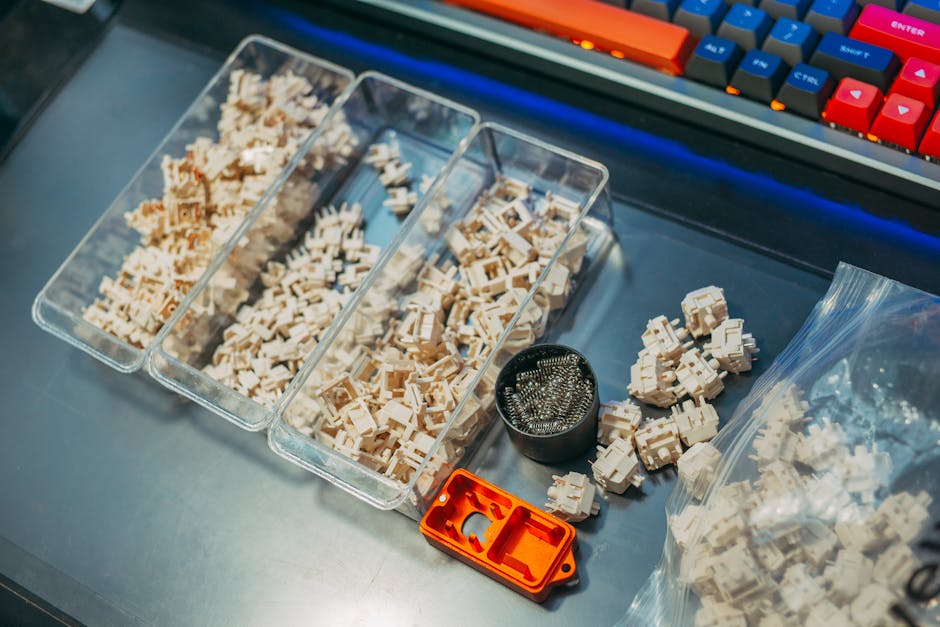
The Enduring Heart: Unveiling the Mechanical Keyboard Lifespan
From my hands-on experience and countless hours spent at the bench, I can tell you that the claim of superior durability for mechanical keyboards isn’t just marketing hype – it’s a verifiable fact. When people ask me, “how long does a mechanical keyboard last?”, my immediate answer is usually, “Longer than you’d expect, and certainly longer than your average membrane keyboard.” While rubber dome keyboards often struggle to last more than 5-7 years under consistent use (and I’ve had more than a few conk out on me around the 2-year mark), mechanical keyboards are engineered for a significantly extended lifespan. The industry average, backed by manufacturer specs and real-world usage data, typically pegs the lifespan of a mechanical keyboard anywhere from 10 to 20 years. Yes, you read that right two decades!
This incredible longevity isn’t just a number; it’s a testament to the fundamental design of these devices. At their core, individual **mechanical switches** are rated for tens of millions of keystrokes. We’re talking anywhere from 50 million to 100 million key presses for popular switch types like Cherry MX, Gateron, and Kailh. To put that into perspective, even a heavy typist averaging 80 words per minute for 8 hours a day, 5 days a week, might only hit around 5-10 million keystrokes a year. Do the math, and suddenly those 50-100 million keystrokes translate into many, many years of faithful service. For me, personally, I’ve had certain mechanical keyboards in my collection for over a decade that still perform flawlessly, a stark contrast to the rapid obsolescence of many other tech gadgets. This kind of durability is a huge part of the justification for their often higher price point – you’re truly buying a long-term companion, not a disposable peripheral.
However, it’s important to understand that this average lifespan isn’t a guaranteed figure written in stone. It’s an aggregate that depends on a multitude of factors, much like the lifespan of a car depends on its make, model, and how well it’s maintained. Not all mechanical keyboards are created equal, and not all users treat their gear the same way. The true durability of your keyboard will be a function of its build quality, your usage habits, and the care you put into maintaining it. But rest assured, the foundational design principles mean that the potential for long-term use is baked right into the very components of these remarkable devices.
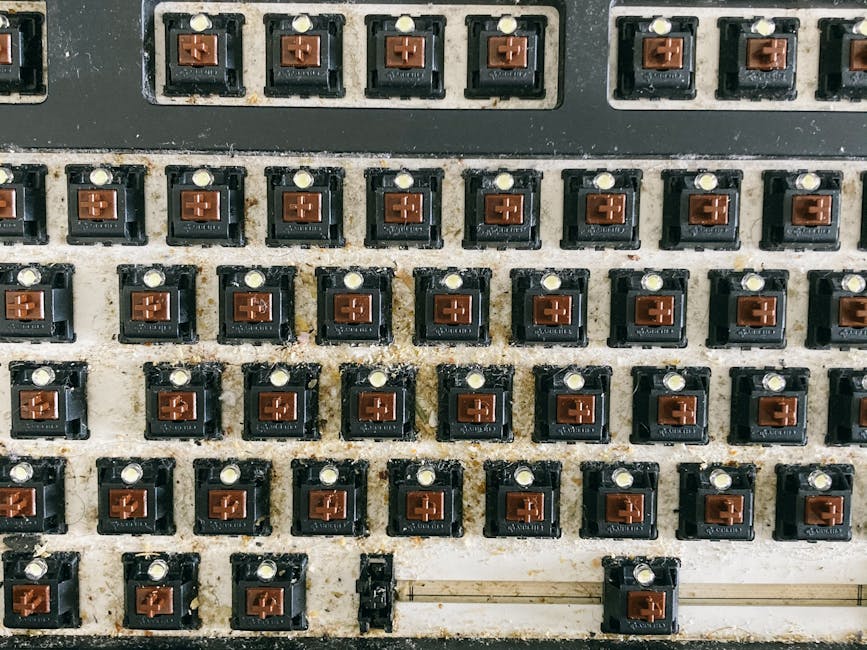
The Core Components: What Defines Mechanical Keyboard Lifespan?
When we talk about the overall **mechanical keyboard lifespan**, we’re really discussing the sum of its parts. Each component plays a role in how long the device endures. Understanding these individual elements helps you appreciate why some boards last longer than others.
The Switches: The Heartbeat of Durability
Undoubtedly, the most critical factor influencing how long does a mechanical keyboard last is the quality and rating of its individual switches. These are the tiny marvels beneath each keycap that register your presses. As mentioned, most quality switches from brands like Cherry MX, Gateron, Kailh, and Outemu are rated for 50-100 million keystrokes. This **keystroke rating** is a key indicator of their longevity. Cheaper, lesser-known brands might have lower ratings, but even those typically far exceed the lifespan of rubber dome switches. Over my years, I’ve swapped out countless switches, and it’s rare to see a quality switch fail prematurely without external influence like a liquid spill. Even then, usually only the affected switches are damaged, not the entire board.
The Printed Circuit Board (PCB): The Nervous System
Beneath the switches lies the **PCB (Printed Circuit Board)**, the electrical backbone of your keyboard. This is where all the connections are made, and the signals from your keystrokes are processed. The quality of the PCB, its soldering, and the firmware it runs are crucial. A well-designed PCB with robust components can last indefinitely. Issues often arise from liquid damage shorting circuits or from physical trauma. Thankfully, advancements in keyboard technology have given us **hot-swappable** PCBs, allowing you to remove and replace switches without soldering. This is a game-changer for longevity, as a single failing switch no longer means a trip to the soldering iron or a condemned keyboard; you can simply pop in a new one. In my opinion, hot-swappable boards significantly extend the practical lifespan of a mechanical keyboard.
Keycaps, Case, and Stabilizers: The Outer Shell and Supporting Cast
While less critical to the keyboard’s functional lifespan, the external components contribute significantly to its perceived durability and user experience:
- Keycaps: These are the caps you actually press. Made from ABS or PBT plastic, they can wear down over time. ABS keycaps, especially cheaper ones, can develop a shiny “finger grease” patina and their legends (letters) can fade or chip. PBT keycaps are generally more durable, resisting shine and wear far better. While worn keycaps don’t stop the keyboard from working, they can make it look old and feel less premium. Replacing keycaps is a common and easy upgrade.
- Case and Plate: The keyboard’s housing and the plate that holds the switches in place. Materials range from plastic to aluminum to steel. A sturdy case and plate not only offer a premium feel but also protect the internal components from impacts and flex. A higher **build quality** here means better protection and less chance of structural damage over time.
- Stabilizers: These components support larger keys like the spacebar, Shift, and Enter, preventing them from wobbling. Over time, stabilizers can become rattly or sticky if not maintained or lubricated. While not a component that “fails” in the same way a switch might, poor stabilizer performance can degrade the typing experience and make a keyboard feel less durable.
In my decade of evaluating hardware, I’ve observed that while switches and PCBs are the absolute core of longevity, the overall perceived durability and satisfaction with how long a mechanical keyboard lasts are heavily influenced by the quality and endurance of these supporting components. A keyboard with great switches but cheap, shiny keycaps or a flimsy case often feels less “durable” in the long run.
Beyond the Specs: Real-World Factors Influencing Durability
While the inherent design and quality of components lay a strong foundation for how long a mechanical keyboard lasts, real-world usage introduces a host of variables. It’s like buying a high-performance car; its theoretical lifespan is one thing, but how you drive and maintain it is another entirely. I’ve personally seen premium keyboards die an early death due to neglect, and budget boards defy expectations with meticulous care.
Usage Patterns: From Feather Touch to Hammer Fists
Your typing style and frequency of use play a significant role. Are you a light typist who just sends a few emails a day, or are you a developer, writer, or gamer who pounds away for 10+ hours? While switches are rated for millions of presses, consistently forceful typing can accelerate wear, even if it’s minimal. Gaming, with its often rapid, repetitive key presses (think W-A-S-D clusters), puts concentrated stress on specific switches. A keyboard used occasionally might truly hit that 20-year mark, whereas a daily driver for a professional eSports player might see switches start to feel a bit different after 5-7 years, even if they’re not technically “failed.” It’s a testament to the robust engineering that even under extreme gaming conditions, these devices hold up remarkably well.
Maintenance: The Silent Lifesaver (or Killer)
This is, in my professional opinion, one of the biggest determinants of how long does a mechanical keyboard last. **Regular cleaning** is paramount. Dust, crumbs, pet hair, skin flakes – they all find their way between and under your keycaps. Over time, this debris can interfere with switch mechanisms, leading to mushiness, sticking, or even outright failure. I can’t tell you how many “broken” keyboards I’ve fixed with just a can of compressed air and a thorough cleaning. And then there are spills. A spilled drink, especially sugary ones, is the archnemesis of any keyboard. Liquid can corrode circuits, short out switches, and leave sticky residue that permanently alters switch feel. While some newer boards offer basic spill resistance, none are truly waterproof, so caution is always advised.
Environmental Factors
The environment where you use your keyboard can also play a subtle but important role. High humidity can contribute to corrosion over many years, though this is less common with modern electronics. Extreme temperature fluctuations might stress components. Even sunlight exposure can prematurely yellow ABS keycaps, affecting the aesthetics, if not the function. While these factors are usually secondary to usage and maintenance, they are worth considering for true long-term preservation.
Modding and Customization: A Double-Edged Sword
The mechanical keyboard hobby thrives on customization. From lubing switches to replacing PCBs, enthusiasts love to tinker. While modifications like lubing can reduce friction and potentially extend switch life, careless modding can inadvertently damage components. Improper soldering, using incompatible parts, or even just being too forceful when disassembling a board can lead to irreversible damage. However, for a savvy user, the modular nature of many mechanical keyboards, especially those with Understanding Hot-Swappable Keyboards, means that individual components can be replaced, effectively extending the device’s life far beyond that of a monolithic, non-repairable peripheral. This aspect is a huge win for durability and sustainability in my book.
Maximizing Your Investment: Tips to Extend Your Keyboard’s Life
So, you’ve invested in a quality mechanical keyboard, and you want it to last you for years, maybe even decades. Great! Here are my top tips, forged from years of personal experience and troubleshooting, to ensure your keyboard defies time and continues to deliver that satisfying typing experience.
- Embrace the Cleanliness Ritual: This is, hands down, the most crucial piece of advice. Make **regular cleaning** a habit. At least once a month, flip your keyboard upside down and give it a gentle shake to dislodge loose crumbs. Use a can of compressed air to blast out dust and debris from between the keycaps. For a deeper clean, carefully remove all keycaps (a keycap puller is essential) and wipe down the plate with a microfiber cloth slightly dampened with isopropyl alcohol. You’ll be amazed at the gunk that accumulates! This prevents sticky switches and maintains consistent performance.
- Mindful Usage & Spill Prevention: While tempting, avoid eating or drinking directly over your keyboard. A moment of carelessness can lead to disaster. If a spill does occur, unplug the keyboard immediately, turn it upside down to drain, and gently pat dry. For larger spills, you may need to disassemble and clean the PCB with isopropyl alcohol (but only if you’re comfortable with electronics repair, otherwise seek professional help). Don’t slam your keys excessively; while switches are durable, a gentle touch goes a long way.
- Invest in Quality Keycaps: If your keyboard came with cheap, thin ABS keycaps, consider upgrading to thicker PBT ones. PBT resists shine and wear much better, keeping your keyboard looking new for longer and preventing legends from fading. It’s an easy, relatively inexpensive upgrade that drastically improves the aesthetic **durability** and feel.
- Consider Switch Lubrication: For enthusiasts, lubing your switches can drastically improve their feel, making them smoother and often quieter. More importantly, it reduces friction between moving parts, which can theoretically extend the lifespan of the switch by reducing physical wear. This is a more advanced maintenance step, but incredibly rewarding.
- Leverage Hot-Swappability: If you have a hot-swappable keyboard, you’re in luck! If a single switch starts to feel mushy or stops working, you don’t need to replace the entire board. Simply pull out the faulty switch and pop in a new one. This modularity is a massive advantage for how long a mechanical keyboard lasts and is a feature I always recommend looking for when purchasing.
- Proper Storage and Transport: If you ever need to transport your keyboard, invest in a protective sleeve or case. Tossing it into a backpack unprotected can lead to bent pins, damaged keycaps, or even internal component stress. When not in use for extended periods, store it in a dust-free environment.
- Firmware and Software Updates: While less about physical longevity, keeping your keyboard’s firmware and drivers updated ensures optimal performance, compatibility, and can fix potential bugs that might affect its functionality over time.
By following these guidelines, you’re not just hoping your mechanical keyboard lasts; you’re actively ensuring it does. It’s about respecting your investment and enjoying a superior typing experience for years to come. For more detailed tips, check out our guide on Maintaining Your Mechanical Keyboard.
Frequently Asked Questions
Q1: Are mechanical keyboards more durable than membrane keyboards?
Absolutely, yes. Mechanical keyboards are inherently more durable. Each key has an individual switch with its own spring and housing, designed for tens of millions of keystrokes. Membrane keyboards, conversely, rely on a rubber dome sheet that degrades and loses its tactile feedback over time, typically lasting only 5-10 million keystrokes. This fundamental design difference means a significant lifespan advantage for mechanical keyboards, offering greater longevity and consistent performance throughout their operational life.
Q2: What’s the most common part to fail on a mechanical keyboard?
The most common “failure” isn’t usually a catastrophic board death but rather an individual switch starting to malfunction. This can manifest as a switch feeling mushy, chattering (registering multiple presses for one input), or simply not registering at all. Other common issues include worn-out keycaps (especially ABS ones becoming shiny or legends fading) or rattling/sticky stabilizers. The PCB itself is quite robust and rarely fails unless subjected to liquid damage or severe physical trauma.
Q3: Can I replace individual switches on my mechanical keyboard?
It depends on your keyboard. If your keyboard features a **hot-swappable** PCB, then yes, you can easily pull out and replace individual switches without any soldering. This is a huge benefit for longevity and customization. If your keyboard is not hot-swappable, replacing a switch requires soldering and desoldering, which is a more advanced task. Always check your keyboard’s specifications before attempting switch replacement.
Q4: Does backlighting affect keyboard lifespan?
While LEDs (Light Emitting Diodes) used for backlighting do have a finite lifespan, it’s typically very long – often exceeding 50,000 hours of continuous operation. In practical terms, the LEDs are likely to last longer than the keyboard’s primary functional components or its relevance in your setup. If an LED does fail, it usually means just that single light goes out, not that the entire keyboard is compromised. Some advanced boards allow for individual LED replacement, but it’s rarely a major concern for overall keyboard lifespan.
Q5: How often should I clean my mechanical keyboard?
For optimal longevity and performance, I recommend a quick, superficial clean (like using compressed air) at least once a month for moderate users, and weekly for heavy users or those who eat/drink near their keyboard. A deeper clean involving keycap removal should be done every 3-6 months. This routine prevents dust, crumbs, and debris from accumulating and interfering with switch mechanisms, which is one of the biggest factors in how long a mechanical keyboard lasts and maintains its premium feel.
My Final Verdict
After more than a decade of dissecting, testing, and using countless keyboards, my answer to “how long does a mechanical keyboard last?” is unequivocally optimistic: a very, very long time. These aren’t disposable pieces of tech; they are thoughtfully engineered tools built for endurance. While the 10-20 year average lifespan might seem aspirational, with proper care and mindful usage, many high-quality mechanical keyboards can certainly achieve and even surpass that. The initial investment might be higher than a membrane keyboard, but the sheer durability, repairability (especially with hot-swappable designs), and consistent typing experience make it a worthwhile and sustainable purchase.
For me, a good mechanical keyboard isn’t just a peripheral; it’s a trusty companion for productivity and play. Treat it well, keep it clean, and it will serve you faithfully for years on end, making it one of the most cost-effective and environmentally friendly tech purchases you can make in the long run. The value proposition is clear: longevity, reliability, and an unparalleled typing experience. For more on the benefits of durable electronics and reducing e-waste, you can explore resources like the EPA’s Electronics Recycling Program.